Merge Tree Barycenter with Branch Mapping
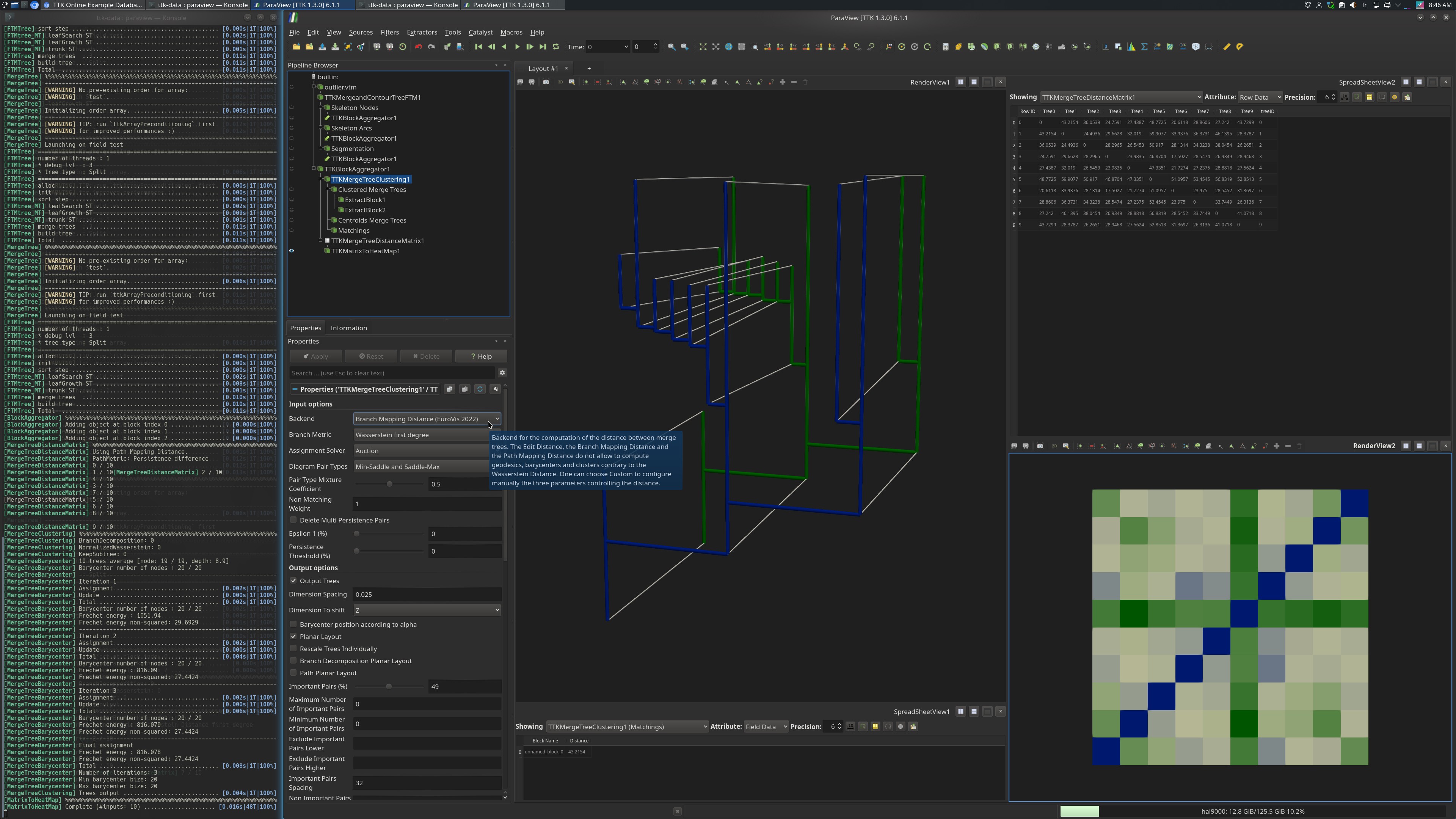
Pipeline description
This example first loads a multi block of scalar fields from disk.
Then, the Split Tree is computed on each scalar field using the MergeTree module.
All these trees are passed to MergeTreeClustering. It computes the distance and corresponding mapping between the first two trees in the metric space of merge trees defined by the branch mapping distance (thus, the underlying metric to the branch mapping distance). The MergeTreeClustering module only computes one distance and one mapping because the actual barycenter computation is not possible with this metric.
In addition, a distance matrix for the input trees is computed with MergeTreeDistanceMatrix.
The python script computes the branch mapping distance and saves the resulting mapping as well as the distance matrix in form of a table. The paraview state file additionally renders the matrix as a heatmap.
ParaView
To reproduce the above screenshots, go to your ttk-data directory and enter the following command:
paraview states/mergeTreeBarycenter_branchMapping.pvsm
Python code
 1
 2
 3
 4
 5
 6
 7
 8
 9
10
11
12
13
14
15
16
17
18
19
20
21
22
23
24
25
26
27
28
29
30
31
32
33
34
35
36
37
38
39
40
41
42
43
44
45
46
47
48
49
50
51
52
53
54
55
56
57 | #!/usr/bin/env python
# state file generated using paraview version 5.10.1
#### import the simple module from the paraview
from paraview.simple import *
# ----------------------------------------------------------------
# setup the data processing pipelines
# ----------------------------------------------------------------
# create a new 'XML MultiBlock Data Reader'
outliervtm = XMLMultiBlockDataReader(FileName=["bdied_outlier/outlier.vtm"])
# create a new 'TTK MergeTree'
tTKMergeandContourTreeFTM1 = TTKMergeTree(Input=outliervtm)
tTKMergeandContourTreeFTM1.ScalarField = ["POINTS", "test"]
tTKMergeandContourTreeFTM1.TreeType = "Split Tree"
tTKMergeandContourTreeFTM1.UseAllCores = 0
# create a new 'TTK BlockAggregator'
tTKBlockAggregator1 = TTKBlockAggregator(
Input=[
tTKMergeandContourTreeFTM1,
OutputPort(tTKMergeandContourTreeFTM1, 1),
OutputPort(tTKMergeandContourTreeFTM1, 2),
]
)
tTKBlockAggregator1.FlattenInput = 0
# create a new 'TTK MergeTreeDistanceMatrix'
tTKMergeTreeDistanceMatrix1 = TTKMergeTreeDistanceMatrix(
Input=tTKBlockAggregator1, OptionalInput=None
)
tTKMergeTreeDistanceMatrix1.Backend = "Branch Mapping Distance (EuroVis 2022)"
tTKMergeTreeDistanceMatrix1.DistanceSquareRoot = 0
tTKMergeTreeDistanceMatrix1.Epsilon1 = 0.0
tTKMergeTreeDistanceMatrix1.Epsilon2 = 100.0
tTKMergeTreeDistanceMatrix1.Epsilon3 = 100.0
# create a new 'TTK MergeTreeClustering'
tTKMergeTreeClustering1 = TTKMergeTreeClustering(
Input=tTKBlockAggregator1, OptionalInputclustering=None
)
tTKMergeTreeClustering1.Backend = "Branch Mapping Distance (EuroVis 2022)"
tTKMergeTreeClustering1.Deterministic = 1
tTKMergeTreeClustering1.DimensionSpacing = 0.05
tTKMergeTreeClustering1.DimensionToshift = "Z"
tTKMergeTreeClustering1.Epsilon1 = 0.0
tTKMergeTreeClustering1.Epsilon2 = 100.0
tTKMergeTreeClustering1.Epsilon3 = 100.0
tTKMergeTreeClustering1.ImportantPairs = 49.0
tTKMergeTreeClustering1.ImportantPairsSpacing = 32.0
tTKMergeTreeClustering1.NonImportantPairsSpacing = 8.0
# save the output
SaveData("merge_tree_mapping.vtm", proxy=OutputPort(tTKMergeTreeClustering1, 2))
SaveData("distance_matrix.csv", tTKMergeTreeDistanceMatrix1)
|
To run the above Python script, go to your ttk-data directory and enter the following command:
pvpython python/mergeTreeBarycenter_branchMapping.py
- outlier.vtm: a vtk multiblock containing 10 regular grids.
Outputs
merge_tree_mapping.vtm: the computed branch mapping as a vtk multiblock.distance_matrix.csv: the distance matrix as a csv table.
C++/Python API
BlockAggregator
MergeTree
MergeTreeClustering
MergeTreeDistanceMatrix